
 11
11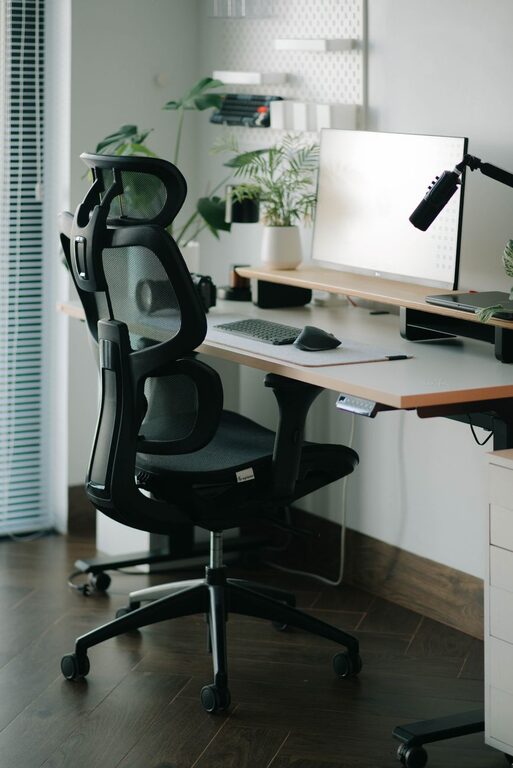
Creating a desk setup that promotes both focus and comfort is essential for a productive workday, whether you work from home or in an office. A well-organized and well-designed workspace not only helps reduce physical strain but also minimizes distractions, allowing you to stay engaged and efficient. In this post, we’ll explore practical tips to optimize your desk setup for better comfort and sharper focus.
Before diving into the specifics, it’s helpful to understand why your desk setup impacts your work. An uncomfortable or cluttered workspace can cause discomfort, fatigue, and distraction. On the other hand, a thoughtfully arranged area encourages good posture, reduces eye strain, and creates an environment conducive to deep concentration.
Your desk should allow you to work comfortably without hunching or overstretching your arms. Ideally, your elbows should rest at a 90-degree angle when typing. Standard desk height is around 28–30 inches, but it’s always best to adjust based on your own height.
If you have space, choose a desk with enough surface area to hold your computer, essential tools, and some personal items without feeling cramped.
Invest in an ergonomic chair that supports your lower back and allows you to sit with your feet flat on the floor. Adjustable height, lumbar support, and armrests can make a big difference. Sitting comfortably helps prevent back pain and keeps you focused.
Place your monitor directly in front of you, about an arm’s length away. The top of the screen should be at or slightly below eye level. This positioning reduces neck strain and helps maintain good posture.
If you use a laptop, consider adding an external keyboard and mouse along with a laptop stand to achieve the right screen height.
Good lighting reduces eye strain and fatigue. Natural light is best, so position your desk near a window if possible. If that’s not an option, use a desk lamp with adjustable brightness and color temperature. Avoid harsh overhead lights or glare on your screen.
Limit your desk items to what you use daily—this reduces distractions and keeps your workspace tidy. Store pens, notebooks, and other tools in organizers or drawers close by.
Unruly cables can create visual clutter and distractions. Use cable clips, ties, or sleeves to keep cords organized and out of the way.
Adding a few personal items like a small plant, a photo, or an inspirational quote can make your workspace inviting without overwhelming it.
Consider wrist rests or ergonomic mouse pads to support your hands and wrists during extended computer use.
If your feet don’t touch the ground comfortably when sitting, use a footrest. Proper foot support helps maintain good posture and reduces strain.
Comfort also depends on the environment. Keep your workspace at a comfortable temperature and ensure good air circulation to stay alert and comfortable.
No matter how perfect your setup, sitting for long periods can cause discomfort. Follow the 20-20-20 rule: every 20 minutes, look at something 20 feet away for at least 20 seconds. Also, stand up and stretch every hour.
Be mindful of how you sit. Keep your back straight, shoulders relaxed, and avoid leaning forward. An ergonomic chair and proper monitor height make it easier to maintain correct posture.
Keep a water bottle nearby and snack healthily to maintain energy and focus throughout the day.
Creating a desk setup that enhances focus and comfort takes some thought and investment, but the payoff is well worth it. By selecting the right furniture, organizing your space, optimizing lighting, and adopting healthy habits, you can boost your productivity and well-being. Start with small changes and adjust your setup over time to find what works best for you.
Remember, your workspace should be a place where you feel comfortable, motivated, and ready to tackle your day. Taking care of your physical environment is a great first step toward achieving that.